

This month’s updates are all about making your experience more intuitive, responsive, and enjoyable. From collaboration to performance, let’s take a look at what’s new.
💬A Fresh New Look for Comments
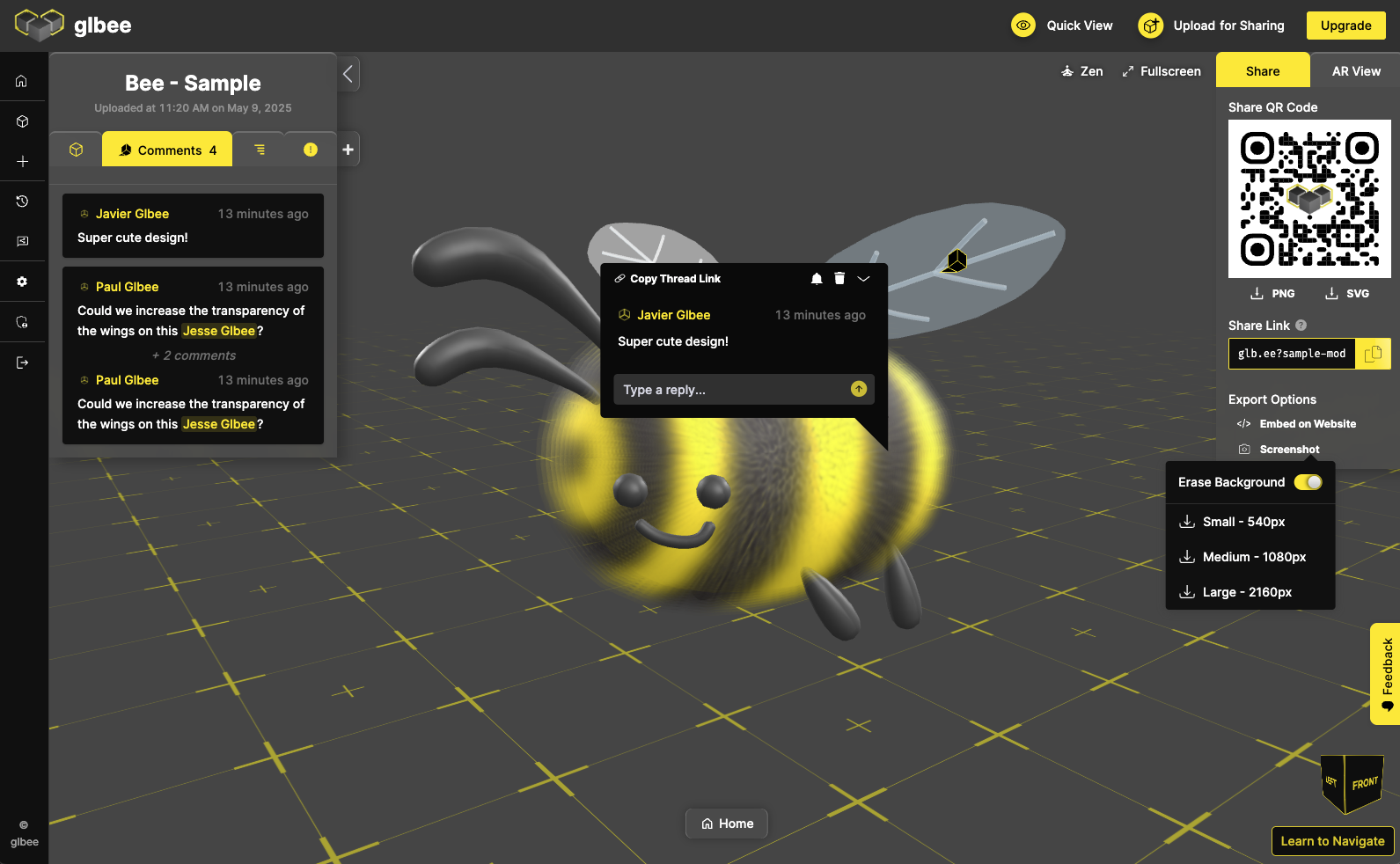
Commenting is smoother, faster, and more familiar, just like your favorite messaging tools.
- Commenting now lives in the left-hand sidebar
- Copying a thread link is just one click and more visible
- Comments are grouped by thread
- Mentions are clearly highlighted and colored based on custom branding
- Edit comments in-line, without losing your place
🖼️ A Cleaner Viewing Experience
We’ve streamlined the UI to help you stay focused:
- Show up to two sidebars at once for better multitasking
- Home controls moved to the bottom for easier access
- Zen and Fullscreen buttons are in the top-right corner, similar to operating systems
- Screenshots now live under export options, where you’d expect
Everything’s still there, just more intuitive.
🔐 Simplified Sharing
We gave sharing a new look too! It is now easier with a single table view and clearer roles:
- Choose from Viewer, Commenter, or Editor. No more overwhelming checkboxes
- Viewers of premium models can now view them in AR without extra steps
🚀 Speed Boosts All Around
- Homepage now loads 3x faster
- Pre-made environments load 4x faster and use far less memory
- No more freezing when creating comments
🐞 Bug Fixes
- Transparent screenshots now download as PNG
- Fixed glitches when zooming in too far
- Sensitivity and input controls are now more consistent
Try the Updates Today
These changes are live — explore them now! Share a model, leave a comment, or just enjoy the smoother ride. They’re designed to make your experience sharper, faster, and more fun.
Have thoughts? We’d love to hear them.