


If you work within the 3D space, it’s almost certain that you’ve experienced some issues sharing your 3D models with your clients. There are plenty of ways to do this of course, but they all come with their pros and cons. In today’s tech world, everything is about speed and streamlined collaboration processes. Anything less, and you’ll be doing yourself and your clients a disservice.
So, what’s the most efficient method of sharing your work? How about a free online 3D model viewer? One that lets you instantly share your work with clients and has a range of features like real-time comments, AR viewing, and customer branding, amongst others. For that, there’s always glb.ee. But maybe we should talk about those other methods before we get to that…
Sharing 3D models via Email

Let’s get the most obvious method out of the way first, shall we? Emailing 3D model files to your client might seem like the best option because it’s simple: we all know how to email. Sure, you can send virtually any file type via email, which is handy. However, there are pitfalls.
If the file size isn’t within the limits of your client’s email server, then you’ve wasted your time. It’s also likely that your client won’t have the correct software needed to open the file, meaning they’ll have to download this. For some clients, this might not be an issue, but there’s always the chance they could get a little frustrated. 3D model viewing software can be a little complicated to navigate, too. The last thing you need is to be wasting time giving a detailed, step-by-step tutorial. It’s not like you can bill for this. You’re welcome to try of course, but your client won’t be best pleased.
Also, transferring these detailed (and often confidential) files via email just isn’t very professional, and we can’t have that. Email isn’t a particularly secure method either, so it’s not the best option for sending sensitive information.
File-Sharing 3D Models

Services like Dropbox and Google Drive are other common ways of sharing your 3D models with clients, and they certainly do have their pros. Firstly, they’re cloud-based, meaning that they’re great for sharing large files. The more specialised platforms, such as WeTransfer, are designed specifically for this. They also boast features like high transfer speeds, link expiration dates, and password protection. This is particularly useful for confidential files. Many also have built-in collaboration tools that allow users to view, comment on, and edit files.
However, much like email, these services are limited, and they’re not specifically catered towards sharing 3D models. Again, your client may not have the software needed to access the file, so they’ll have to go through the whole hassle of installation. The transferring process can also lead to file corruption, which could frustrate your client. The last thing you need is an unhappy client, or worse, a one-star review (insert sad emoji here).
3D File Transfer Using Flash Drive

Sure, flash drives are easy to use, and they can hold gigabytes of data. And yes, they can be accessed offline, so they’re great for using on the go. They also give you a physical copy of the file; one that you can put in your pocket. However, there are drawbacks, too. We’ve already mentioned the difficulty with installing new software, so we won’t labour that point again. Their most obvious shortcoming is that they’re a form of physical file transfer. This might be all right if your client is just down the hall, but that’s extremely unlikely. In fact, in today’s world it’s possible they’re not in the same city, or country. You’re welcome to send your flash drive by postal service, but we don’t need to tell you how impractical – and unprofessional – this is.
The Best Way to Share 3D Models with Clients
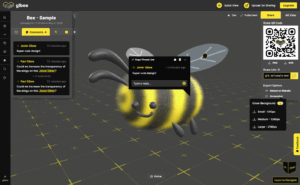
Sure, emailing your models is fine, and so is file-sharing, but they’re not the most professional methods of sharing your work. If only there was an easy-to-use, free online 3D model viewer that didn’t require installing complicated software. A way to instantly share your 3D models with clients that was as simple as a drag and drop. A web-based app with features such as short link creation, QR code generation, model analytics, commenting, and augmented reality viewing.
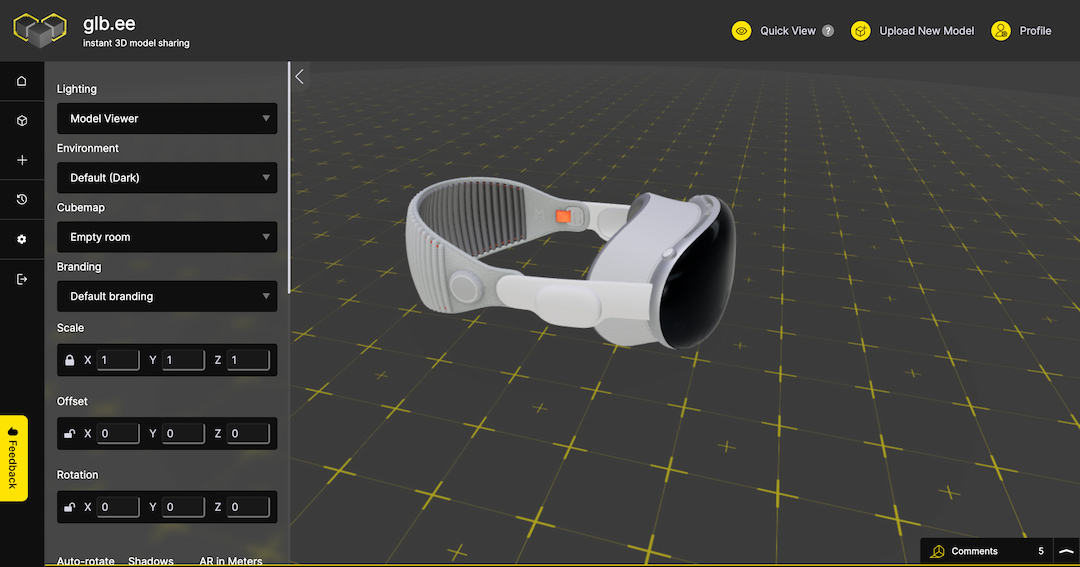
Wait, there is? Oh yes, that’s right. That’s exactly what glb.ee is. With our free online 3D model viewer, you can quickly and easily do all this, and so much more. Simply drop your 3D file onto your dashboard and it’ll generate a free link that you can instantly share with your client. So, if you’re looking for a platform that’s user-friendly, feature heavy, and supports all the major 3D file types, try our free tool today. Changing the way you do business is as simple as a couple of clicks.
To try glb.ee for free today click here